How to Fix Common Errors in Filmora Mod APK
Nothing is more frustrating than downloading Filmora Mod APK and running into errors before you can even start editing. Installation failures, sudden crashes, parse errors, and export problems are the most common complaints from users — and most of them have simple fixes. This guide covers every major Filmora Mod APK error, explains why it happens, and gives you step-by-step solutions that actually work.
Before anything else: the 2-minute diagnosis
Most Filmora errors trace back to the file, the phone, or the space — in that order. Check these three first, before trying random fixes: (1) File size. The complete current Filmora Mod APK is about 204 MB. If your file is far smaller, the download is incomplete or it is not the real editor — re-download before anything else. (2) Free space. Keep at least 2 GB free: the installer needs room to unpack, and exports need temporary space of roughly two to three times the final video’s size. (3) What’s already installed. A different Filmora build already on the phone — the official app or a mod from another source — blocks installation until it is removed, because their signatures differ. Nine out of ten errors below are one of these three.
Filmora Mod APK Not Installing
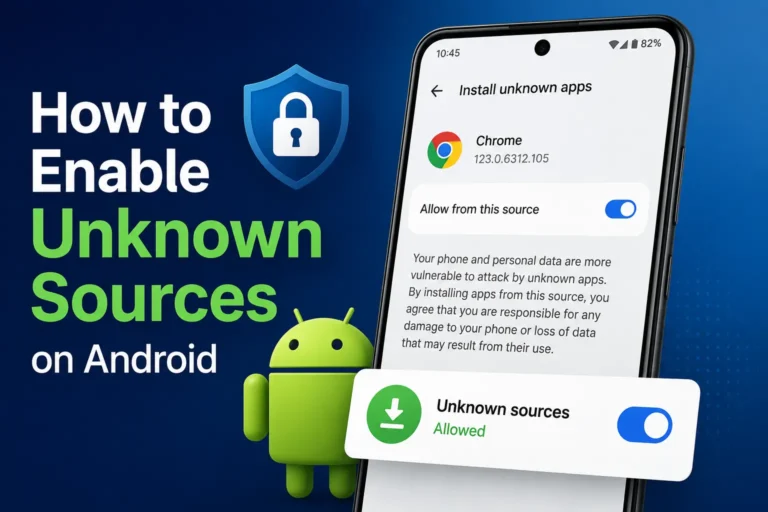
If the APK file will not install at all, the cause is almost always one of these. Enable unknown sources: Android blocks installations from outside the Play Store by default. Go to Settings, find the “Install unknown apps” option, and allow your browser or file manager to install apps. Our guide to enabling unknown sources walks through this for every Android version. Free up storage space: the APK needs around 200MB plus extra room for temporary files. Download a fresh copy: incomplete or corrupted downloads are a frequent cause. Re-download the file from a trusted source.
The cause most lists miss is a signature conflict. Every Filmora build is signed with a digital key; the official app and each mod source use different keys, and Android will not install one over the other — it just says ‘App not installed’. If any Filmora is already on your phone, uninstall it first (export your projects before you do — uninstalling deletes in-app data). The same refusal appears if you try to install an older version over a newer one: Android never installs a lower version code over a higher one. And on Samsung phones, check Auto Blocker too — our Unknown Sources guide covers both settings.
Filmora Mod APK Keeps Crashing
Restart your phone to clear temporary memory issues. Clear the app cache via Settings > Apps > Filmora > Storage > Clear Cache. Close background apps before editing. Reinstall the app: if crashes started after an update, uninstall completely and install Filmora Mod APK without root again. Check your Android version: the latest versions need Android 7.0 or higher.
If the crashes started right after you ‘updated’, suspect leftover data from the previous build — especially if the two builds came from different sources and carry different signatures. The reliable ladder is: clear cache → clear data (you will lose in-app projects, so export first) → clean reinstall after a phone restart. Crashes that happen only during export are usually heat or storage, not the app itself: free up space, close other apps, and let the phone cool down.
Parse Error When Installing Filmora Mod APK
A “Parse Error” means Android cannot read the APK file. Common reasons: the file did not download completely — re-download it; the APK is corrupted — try a different source; your Android version is too old; the file was renamed with the wrong extension. In most cases, downloading a fresh copy from a reliable source fixes it.
Use the size test first: a parse error on a file that is much smaller than about 204 MB almost always means a truncated download — the package is literally incomplete, so Android cannot read its contents. A parse error on a full-size file points elsewhere: the file may be a renamed .xapk/.zip bundle (rename tricks do not work — get the plain .apk), or the phone’s Android is older than the app’s minimum, which old devices also report as a parsing problem. Current Filmora builds need Android 7.0 or later.
Filmora Mod APK Export Failed
Free up storage: keep at least 1–2GB free before exporting. Lower the export resolution: try 1080p if 4K fails. Shorten or simplify the project: too many layers and effects can overwhelm the app. Restart the app before exporting for a fresh session.
Two causes hide behind most export failures. First, temporary space: rendering writes a working copy, so a 500 MB video can need well over 1 GB free while it exports — ‘some space’ is not enough, keep 2 GB or more. Second, battery management: aggressive battery savers (and Samsung/Xiaomi battery optimizers) can kill a long render in the background. If exports die partway on a big project, exclude Filmora from battery optimization and keep the app in the foreground. And if an export fails at the same percentage every time, the problem is a specific clip or effect at that point in the timeline — remove or replace that element and export again.
Black Screen When Opening Filmora Mod APK
Wait 30 seconds on first launch while the app extracts files. Force stop and reopen via Settings > Apps. Clear cache. Reinstall cleanly: uninstall, restart your phone, then install the APK again.
One variant has a different cause: if you get a black screen but can hear the video’s audio during preview, the app is fine — the source clip’s codec is the problem. Re-import the clip, or convert it to a standard MP4 (H.264) first. A fully black screen with no sound, on the other hand, is the app itself — work through the force-stop, cache and clean-reinstall steps above.
Premium Features Not Unlocked After Installing
Check the version: make sure you downloaded a fully unlocked build. Do not update from the Play Store: it replaces the mod with the official version and locks everything again — disable auto-updates for this app. Reinstall the mod completely from a trusted source.
Separate two situations that look alike. If EVERYTHING is locked — watermark back, effects crowned — you are no longer running the mod: usually the Play Store replaced it with the official build, or the file was never a mod. If only AI generation and credit-based features ask for an account, nothing is broken: those are billed on Wondershare’s servers and stay locked in every mod. Our Filmora Pro Unlock guide explains the two kinds of premium in full.
Frequently Asked Questions
Why does Filmora Mod APK say “App not installed”?
Usually unknown sources are disabled, storage is full, or a conflicting Filmora version is already installed. Enable unknown sources, free up space, and uninstall any existing version first.
Is it normal for Filmora Mod APK to lag on old phones?
Yes. Older devices with less than 4GB of RAM will struggle with effects-heavy projects.
Will reinstalling delete my projects?
Uninstalling deletes projects saved inside the app. Export finished videos before reinstalling.
Should I worry if errors keep coming back?
Recurring errors across fresh installs usually point to a bad APK source. Switch to a trusted download source.
Why does the export fail at the same percentage every time?
Because the failure sits at a fixed point in your timeline — usually one damaged clip, an unsupported codec, or a heavy effect at that timestamp. Find the moment (percentage × total length), remove or replace that element, and export again.
‘App not installed’ — even though I uninstalled the old app. What now?
Restart the phone first (leftover installer state clears), then check storage and try again. If you are installing an older build over where a newer one was, remember Android refuses downgrades by version code; and on Samsung, confirm Auto Blocker is off.
Final Thoughts on Fixing Filmora Mod APK Errors
Almost every Filmora Mod APK error comes down to a bad download, a device setting, or low resources. Work through the fixes above in order and you will resolve the vast majority of problems in a few minutes.